OpenCV - Computer Vision Library

OpenCV is an open source computer vision library developed by Intel. This library is written in C/C++ and it has lot of very powerful image processing features.

I got to know about this library few months back when I was doing researches for our final year project. Our project "Sign2Voice" interprets signs of sign language to voice in real time using a video captured using simple webcam.

OpenCV has rich image processing API that that provides wide range of functionally ranging from simple image processing tasks to machine learning algorithms.  In our project we uses OpenCV library to detect and identify sign language hand gestures. We uses Haar-Cascade classifier provided with OpenCV to detect hand. After training the classifier with set of positive and negative images we can use the classifier to detect objects. OpenCV has a good trained classifier for face detection.

Training of Haar-classifier is not an easy task. This became especially difficult because there is nor proper documentation for this process. Their are few web sites that give instructions on how to train, but they are not that comprehensive.

We had to do lot of experiments and learn through trail and error to find out how to do the training properly. After lot of failures we managed to achieve good results in had detection. 

hand_detect hand_detect1


I'm planning to do some posts regarding how to train haar-classifier share the knowledge I gained with you in future. So keep you figures crossed. :)
 

Artificial Neural Networks for Solving Complex Problems

I just completed my independent study review paper. As the title suggests, it was about "Using Artificial Neural Networks to Solve Complex Problems". If you haven't heard about neural networks before, they are a new approach for solve problem inspired by inner workings of human brain. In traditional computing we have to give step by step instructions on how to solve specific problem to the computer. But in ANN that is not necessary, they can learn how to solve a particular problem from samples.

ANN technology is not a new thing, they exist since 1940s. When I first started this study, I thought that ANNs are only used for pattern recognition/classification and predicting some factors. But when I go more deeper in to the research, I was amazed by the diversity of fields where ANN is used. Most of the applications I came across during my review were successful in achieving their goals, but in field of cryptography use of ANN was not as successful as other fields.

Even though ANN technology is very successful in solving complex problem they have their own set of limitations. Major limitation is it's lack of ability to explain how they generate output. Another main limitation is not having formal method to find optimal network architecture for solving particular problem. But even with these limitations, future of ANN looks promising. There is lot of research going on in dedicated ANN hardware and hybrid ANNS. 

You can download my complete review paper here. Hope this will help you to learn more about ANN and it's applications.


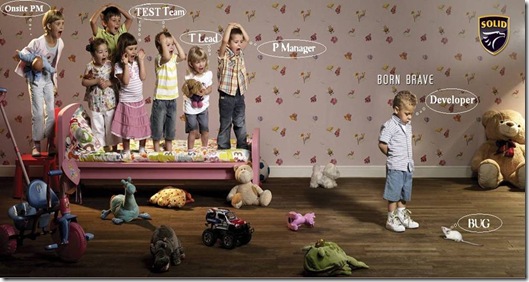
A Picture is Worth More Than Thousand Words

This picture tells the whole story....ATT1135779


Being Punctual....

Well, what do you think about this....being punctual?

I’m not sure about you, but I hate people coming late and not doing things on time. Especially in here most of the people don’t take this seriously, they never come on time. As an undergraduate I have seen lot of my batch mates coming to lectures, group meetings late. They are the most selfish people; they don’t think that they are wasting time of others. As professionals I think we should learn about how to do time management and being punctual.

I found these two articles at lifehack about the importance of being punctual and most importantly how to do that. Hope this will encourage you to be punctual...


සාමයේ පහන් දැල්වෙන, සුභ වෙසක් මංගල්‍යයක් වේවා - Have a Peaceful Vesak

vesak-card-2


University of Moratuwa is the 1st in Top 10 Universities for Google Summer of Code 2008

Few weeks back I posted about that Sri Lanka being among the top ten counties in Google Summer of Codes 2008. But there is more good news. This time among top 10 universities. I'm very proud to see that University of Moratuwa(UOM) is the 1st among top 10 universities. This is a BIG BIG achievement for us.

Congratulations to all my friend at UOM.  


image

image

Read more about this....
 

Sri Lanka among Top 10 for Google Summer of Code 2008

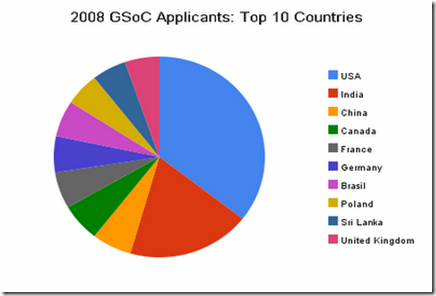
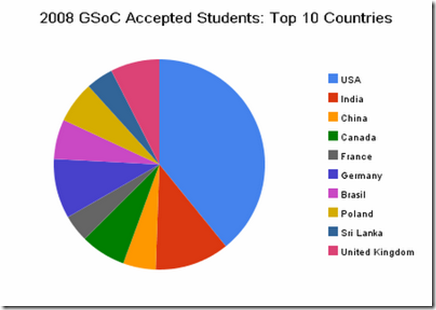
Sri Lankan academic community is making its name more and more visible in the global arena. I saw this in the Google Open Source Blog which list out the top 10 countries at Google Summer of Codes 2008. It is very happy to see that Sri Lanka is among the top in both applicants and accepted project vise. 

image

image

See the full blog post at Google Open Source Blog...


Imagine Cup is back to UOM

Yesterday we had the final round of the Software Design category of the Imagine Cup Sri Lanka competition. There were six teams selected for the finals. Out of that six, three teams were from University of Moratuwa, two from UCSC and other one from SLIIT.

This years theme was "Imagine a world where technology enables sustainable environment", so all of the projects were about how we can save our planet Earth.

For the fourth convective time undergraduates from University of Moratuwa managed to win the trophy. This time it was a joint effort by both Faculty of Information Technology and Engineering. Team "Sasrutha" presenting the project "Haritha Prayathna" won the 1st place.  They will fly to France on July to participate for the global finals.

Like last time this year also 2nd place was won by team "Gagana" from SLIIT and 3rd place was won by team "Will Power" from University of Moratuwa, Faculty of Engineering.

Congratulations to the winners.


Wish You All a Very Happy Sinhala and Tamil New Year


සුභ අලුත් අවුරැද්දක් ‍‍‍ෙව්වා

Happy New Year - Suba Aluth Avruddak Vewa


Imagine Cup 2008 Sri Lanka Finals

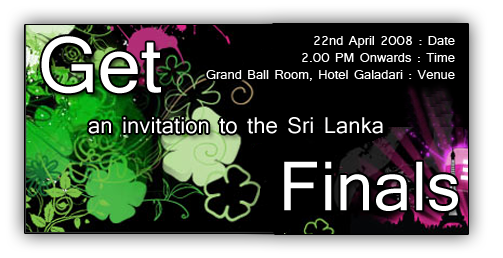
Get invited for Imagine Cup 2008 Sri Lanka finals It is your chance to get an invitation to participate for the Sri Lanka's premier IT event. Hurry up.


MySQL taking long time to connect

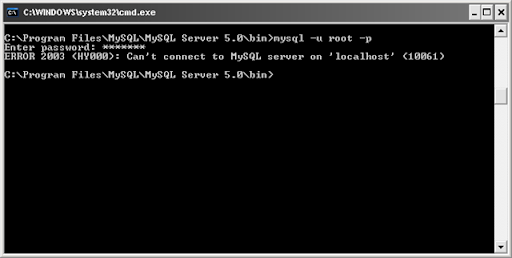
Today I experienced strange issue with MySQL server which I'm using to developing and testing applications. Today it took unbelievably long time to connect. When I try to connect to the server using, do not connect and after long time it gave an irrelevant error.

mysql error message

I searched the net to find what could be the issue, and found this which is somewhat similar to my issue. But I couldn't fix the issue :(. Finally I uninstall MySQL and reinstall it. Haa... it works properly :D.

Ok, reinstalling may not be the best way to it, their may be some work around for this issue. If you know something about this issue please be kind enough to share it with me. :))


After Long Time...

It's being a while since my last post. It was mainly due to I'm being busy with my studies for the end semester exams. Today was the final day :D. Now I'm free again till the final semester starts at the end of April and hope to do more blogging :)).


Microsoft Excel as 3D Game Engine??

Today I came across this wonderful article which shows how Microsoft Excel can be used to render 3D graphics. Sounds amazing isn't it.....

3D grapgics rendering in MS Excel


TreeTable in Java using SwingX

TreeTable is a combination of Tree and Table. It can be very nice component when you want to display tabular data in a hierarchical manner. Last week when I was looking for a component that can be used to implement TreeTable, I came across JXTreeTable. It is a component of SwingX package by SwingLabs.

TreeTable

Using JXTreeTable we can create TreeTable very easily. Only difficult part is creating the DataModel to match with our requirement.

This is the sample application, I did for my HCI assignment with contains code for how to use  JXTreeTable. You can download SwingX here. Hope this will be helpful for you.


Maximum RAM supported in Windows XP

Recently I assembled a new computer with 4GB RAM. My motherboard supports up to 8GB RAM and Widows XP supports 4GB RAM so no problem.....

But when I open the System Properties, it shows only 3.23GB of RAM. Where did the rest go? OK, I'm using onboard VGA with 256MB memory, so part of the RAM will be allocated to that and will not be shown in System Properties. But even with that there is considerable amount of RAM is missing.

4GB RAM not showing in System Properties.

I wanted to know why it is. So I did an Google search and found out this. Reason is XP uses its 32bit address space not only to address memory but also to address some other components like System ROM , APIC(s),Integrated PCI devices, such as network connectors and SCSI controllers, PCI cards , Graphics card, etc... Because of this some part of the ram may not be accessible by the operating system since it ran out of address space.


Using Bookmarks in Eclipse

When we are writing programs it is important to keep track of important locations in the code. Using Bookmarks are the easiest way to do it. But in Eclipse that feature is some what hidden. By default there is no shortcut for that as well.

To add a Bookmark chose the code fragment you want to bookmark and from Edit menu select Add Bookmark. Once the bookmark is added there will be a small blue rectangle in the left hand side of the code window and a green rectangle in right had side of the code window. To view all the bookmarks that you added you have to bring in the Bookmarks view. Select Window > Show View > Other… from the main menu. Type "bookmark" in the filter box of the Show View Dialog box and select Bookmarks view.

Eclipse Show Views

 Eclipse Bookmarks Vie

To make the process of adding bookmarks easy you can create a shortcut key combination for it. To do that choose Window > Preferences from the main menu, which brings up the Preferences dialog. Then type in “key” in the filter box, which takes you to General>Keys. Then selects the Modify tab. Select “Edit” from the Category drop-down. Then choose “Add Bookmark” from the Name drop-down. Then click in the Key Sequence > Name text box. Then hold down the keys you want to use for your keyboard shortcut. I selected Alt+B for this. You can selects any unassigned key combination for this. Finally click Add.

Now you can use this shortcut to add bookmarks very easily. Cool isn't it?..............


Food for your thoughts....


RMS and Philosophy of Free Software

rms

Last Friday I got once in a life time opportunity to participate in a conference where Richard Stallman (RMS) did the key note speech.  If you do not know who is RMS, he is the father of "Free Software Foundation" and he is the one who started GNU project. He is a really interesting guy.

From that key note speech I got to know about four freedoms related to free software.

0. The freedom to run the program as you wish.

1. The freedom to study the program's source code and then change it so the program does what you wish.

2. The freedom to distribute exact copies to others, when you wish.

3. The freedom to distribute copies of your modified versions to others, when you wish.

Other than that I learnt that it is note fair name popular open source OS "Linux" as "Linux". It has to be corrected GNU/Linux since Linux is only the kernel where GNU project developed all other components required for the OS.  


ZOTERO, Ultimate Research Tool for Students

As students we have to do lot of research on various subjects. when we go researching stuff in the Internet, sometimes it can be very difficult to keep up with the information we come across and keep them organized. Before I came across this wonderful tool Zotero what I did was save all important  web pages, PDF documents, etc... in one folder and later open one by one and read them. When I'm writing a report on something this opening one by one and reading it can be really annoying.

But with Zotero all this can be done very easily. This Firefox extension can keep everything very organized. Zotero can save files, PDFs, images, links, and snapshots of web pages along with the citation.

Here are some of the other features that Zotero has to offer:

  • Automatic capture of citation information from web pages
  • Storage of PDFs, files, images, links, and whole web pages
  • Flexible notetaking with autosave
  • Fast, as-you-type search through your materials
  • Playlist-like library organization, including saved searches (smart collections) and tags
  • Platform for new forms of digital research that can be extended with other web tools and services
  • Runs right in your web browser
  • Formatted citation export (style list to grow rapidly)
  • Free and open source
  • Shared collections
  • Remote library backup
  • Integration with Microsoft Word and other word processors
  • Access your library from anywhere via the web
  • Advanced search and data mining tools
  • Recommendation engine and RSS feeds
  • Wide variety of import/export options

zotero


Eclipse's Local History Saved Me ...

Today while I was working on our "Financial Planing System" project I replaced one simple code fragment throughout the project. That ruined how the application works. Since I've changed nearly 20 source files correcting would have been a nightmare.

But fortunately, Eclipse is keeping track of the local changes done to source file. Because of that I've been able to replace the changes I did using that.

select

You can compare the changes you have done very easily.

LocalHistory_Compair 

This is a really cool feature to have, specially if you are not using source control system. Even with source control local history can be very useful.