Sri Lanka among Top 10 for Google Summer of Code 2008

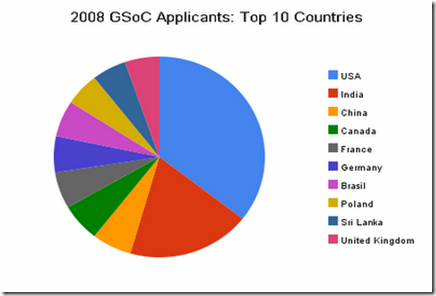
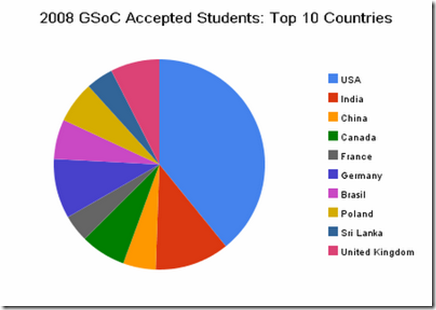
Sri Lankan academic community is making its name more and more visible in the global arena. I saw this in the Google Open Source Blog which list out the top 10 countries at Google Summer of Codes 2008. It is very happy to see that Sri Lanka is among the top in both applicants and accepted project vise. 

image

image

See the full blog post at Google Open Source Blog...


Imagine Cup is back to UOM

Yesterday we had the final round of the Software Design category of the Imagine Cup Sri Lanka competition. There were six teams selected for the finals. Out of that six, three teams were from University of Moratuwa, two from UCSC and other one from SLIIT.

This years theme was "Imagine a world where technology enables sustainable environment", so all of the projects were about how we can save our planet Earth.

For the fourth convective time undergraduates from University of Moratuwa managed to win the trophy. This time it was a joint effort by both Faculty of Information Technology and Engineering. Team "Sasrutha" presenting the project "Haritha Prayathna" won the 1st place.  They will fly to France on July to participate for the global finals.

Like last time this year also 2nd place was won by team "Gagana" from SLIIT and 3rd place was won by team "Will Power" from University of Moratuwa, Faculty of Engineering.

Congratulations to the winners.


Wish You All a Very Happy Sinhala and Tamil New Year


සුභ අලුත් අවුරැද්දක් ‍‍‍ෙව්වා

Happy New Year - Suba Aluth Avruddak Vewa


Imagine Cup 2008 Sri Lanka Finals

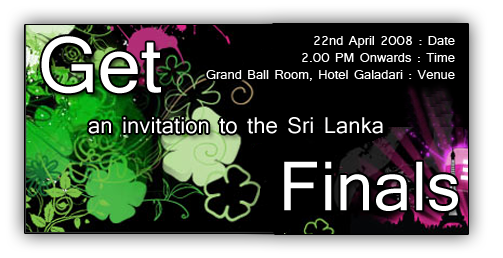
Get invited for Imagine Cup 2008 Sri Lanka finals It is your chance to get an invitation to participate for the Sri Lanka's premier IT event. Hurry up.


MySQL taking long time to connect

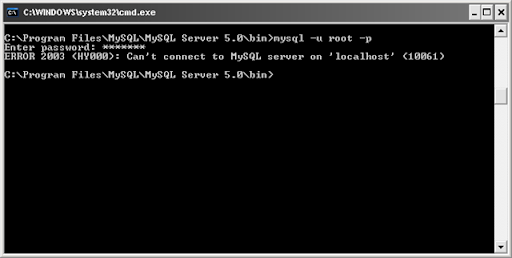
Today I experienced strange issue with MySQL server which I'm using to developing and testing applications. Today it took unbelievably long time to connect. When I try to connect to the server using, do not connect and after long time it gave an irrelevant error.

mysql error message

I searched the net to find what could be the issue, and found this which is somewhat similar to my issue. But I couldn't fix the issue :(. Finally I uninstall MySQL and reinstall it. Haa... it works properly :D.

Ok, reinstalling may not be the best way to it, their may be some work around for this issue. If you know something about this issue please be kind enough to share it with me. :))


After Long Time...

It's being a while since my last post. It was mainly due to I'm being busy with my studies for the end semester exams. Today was the final day :D. Now I'm free again till the final semester starts at the end of April and hope to do more blogging :)).


Microsoft Excel as 3D Game Engine??

Today I came across this wonderful article which shows how Microsoft Excel can be used to render 3D graphics. Sounds amazing isn't it.....

3D grapgics rendering in MS Excel


TreeTable in Java using SwingX

TreeTable is a combination of Tree and Table. It can be very nice component when you want to display tabular data in a hierarchical manner. Last week when I was looking for a component that can be used to implement TreeTable, I came across JXTreeTable. It is a component of SwingX package by SwingLabs.

TreeTable

Using JXTreeTable we can create TreeTable very easily. Only difficult part is creating the DataModel to match with our requirement.

This is the sample application, I did for my HCI assignment with contains code for how to use  JXTreeTable. You can download SwingX here. Hope this will be helpful for you.


Maximum RAM supported in Windows XP

Recently I assembled a new computer with 4GB RAM. My motherboard supports up to 8GB RAM and Widows XP supports 4GB RAM so no problem.....

But when I open the System Properties, it shows only 3.23GB of RAM. Where did the rest go? OK, I'm using onboard VGA with 256MB memory, so part of the RAM will be allocated to that and will not be shown in System Properties. But even with that there is considerable amount of RAM is missing.

4GB RAM not showing in System Properties.

I wanted to know why it is. So I did an Google search and found out this. Reason is XP uses its 32bit address space not only to address memory but also to address some other components like System ROM , APIC(s),Integrated PCI devices, such as network connectors and SCSI controllers, PCI cards , Graphics card, etc... Because of this some part of the ram may not be accessible by the operating system since it ran out of address space.


Using Bookmarks in Eclipse

When we are writing programs it is important to keep track of important locations in the code. Using Bookmarks are the easiest way to do it. But in Eclipse that feature is some what hidden. By default there is no shortcut for that as well.

To add a Bookmark chose the code fragment you want to bookmark and from Edit menu select Add Bookmark. Once the bookmark is added there will be a small blue rectangle in the left hand side of the code window and a green rectangle in right had side of the code window. To view all the bookmarks that you added you have to bring in the Bookmarks view. Select Window > Show View > Other… from the main menu. Type "bookmark" in the filter box of the Show View Dialog box and select Bookmarks view.

Eclipse Show Views

 Eclipse Bookmarks Vie

To make the process of adding bookmarks easy you can create a shortcut key combination for it. To do that choose Window > Preferences from the main menu, which brings up the Preferences dialog. Then type in “key” in the filter box, which takes you to General>Keys. Then selects the Modify tab. Select “Edit” from the Category drop-down. Then choose “Add Bookmark” from the Name drop-down. Then click in the Key Sequence > Name text box. Then hold down the keys you want to use for your keyboard shortcut. I selected Alt+B for this. You can selects any unassigned key combination for this. Finally click Add.

Now you can use this shortcut to add bookmarks very easily. Cool isn't it?..............


Food for your thoughts....


RMS and Philosophy of Free Software

rms

Last Friday I got once in a life time opportunity to participate in a conference where Richard Stallman (RMS) did the key note speech.  If you do not know who is RMS, he is the father of "Free Software Foundation" and he is the one who started GNU project. He is a really interesting guy.

From that key note speech I got to know about four freedoms related to free software.

0. The freedom to run the program as you wish.

1. The freedom to study the program's source code and then change it so the program does what you wish.

2. The freedom to distribute exact copies to others, when you wish.

3. The freedom to distribute copies of your modified versions to others, when you wish.

Other than that I learnt that it is note fair name popular open source OS "Linux" as "Linux". It has to be corrected GNU/Linux since Linux is only the kernel where GNU project developed all other components required for the OS.  


ZOTERO, Ultimate Research Tool for Students

As students we have to do lot of research on various subjects. when we go researching stuff in the Internet, sometimes it can be very difficult to keep up with the information we come across and keep them organized. Before I came across this wonderful tool Zotero what I did was save all important  web pages, PDF documents, etc... in one folder and later open one by one and read them. When I'm writing a report on something this opening one by one and reading it can be really annoying.

But with Zotero all this can be done very easily. This Firefox extension can keep everything very organized. Zotero can save files, PDFs, images, links, and snapshots of web pages along with the citation.

Here are some of the other features that Zotero has to offer:

  • Automatic capture of citation information from web pages
  • Storage of PDFs, files, images, links, and whole web pages
  • Flexible notetaking with autosave
  • Fast, as-you-type search through your materials
  • Playlist-like library organization, including saved searches (smart collections) and tags
  • Platform for new forms of digital research that can be extended with other web tools and services
  • Runs right in your web browser
  • Formatted citation export (style list to grow rapidly)
  • Free and open source
  • Shared collections
  • Remote library backup
  • Integration with Microsoft Word and other word processors
  • Access your library from anywhere via the web
  • Advanced search and data mining tools
  • Recommendation engine and RSS feeds
  • Wide variety of import/export options

zotero


Eclipse's Local History Saved Me ...

Today while I was working on our "Financial Planing System" project I replaced one simple code fragment throughout the project. That ruined how the application works. Since I've changed nearly 20 source files correcting would have been a nightmare.

But fortunately, Eclipse is keeping track of the local changes done to source file. Because of that I've been able to replace the changes I did using that.

select

You can compare the changes you have done very easily.

LocalHistory_Compair 

This is a really cool feature to have, specially if you are not using source control system. Even with source control local history can be very useful.


Happy New Year 2008


HappyNewYear

Wish You all a Very Happy New Year.....


2008 Sri Lankan Holiday List

There is only few days for the dawn of the new year, 2008. It is time to get organized for the new year. As with last year I thought of creating a Sri Lankan holiday list.

Outlook Holiday List

– – – – – – – – – Start Copy – – – – – – – – –

[Sri Lanka] 25
Tamil Thai Pongal Day(BPM),2008/1/15
Duruthu Full Moon Poya Day(BPM),2008/1/22
National Day(BPM),2008/2/4
Navam Full Moon Poya Day(BPM),2008/2/20
Mahasivarathri Day(BP),2008/3/6
Milad-Un-Nabi (Holy Prophet’s Birthday)(BPM),2008/3/20
Medin Full Moon Poya Day(BPM),2008/3/21
Good Friday(BP),2008/3/21
Day Prior to Sinhala & Tamil New Year Day(BPM),2008/4/12
Sinhala & Tamil New Year Day(BPM),2008/4/13
Bak Full Moon Poya Day(BPM),2008/4/19
May Day(BPM),2008/5/1
Vesak Full Moon Poya Day(BPM),2008/5/19
Day following Vesak Full Moon Poya Day(BPM),2008/5/20
Poson Full Moon Poya Day(BPM),2008/6/18
Esala Full Moon Poya Day(BPM),2008/7/17
Nikini Full Moon Poya Day(BPM),2008/8/16
Binara Full Moon Poya Day(BPM),2008/9/14
Id-Ul-Fitr (Ramazan Festival Day)(BP),2008/10/1
Vap Full Moon Poya Day(BPM),2008/10/14
Deepavali Festival Day(BP),2008/10/27
Il Full Moon Poya Day(BPM),2008/11/12
Id-Ul-Alha (Hadji Festival Day)(BP),2008/12/9
Unduvap Full Moon Poya Day(BPM),2008/12/12
Christmas Day(BPM),2007/12/25

– – – – – – End Copy – – – – – – –

Please follow the instructions given in my last post to add holiday list to outlook. Note that if you have last year’s list under Sri Lanka you will need to replace it with this year’s ones

Google Calendar

Click on the button to add the Holiday Calendar to your Google calendar.


Defragment your Hard disk with Defraggler

Defraggler is a cool utility that lets you to defragment your hard drive. If you have used windows defragmenter, I think you know that it requires at least 15% of free disk space to perform defragmenting of the drive. Some times this can be very annoying. Specially for me this is very annoying since my C drive is only 10GB and it fills up very quickly and  can't even defragment since it do not have 15% free space.

Defraggler is the solution for this. This little tool allows you to defragment your hard drive with out any restriction of free disk space. Unlike default windows defragmenter this nice tool facilitates you to defragment individual files as well. Another cool thing about Defraggler is that it is portable, means that you can run it on an USB.

defrag1


Imagine Cup 2008 Launch at University of Moratuwa

Yesterday 12th December we had a grand event at the university for the launch of the Imagine Cup 2008 competition. Event was organized by the Microsoft Student Champs community at the Faculty of Information Technology.

ic2008_1 Event was not only about the Imagine Cup, there was the launch of the sourceFEED - which is the new online resource center developed by student champs. SourceFEED was a long requested thing by the faculty students, it provided access to lot of online learning material and Microsoft latest software products that the faculty get through MSDNAA. Launch of the sourceFEED was done by the university vice chancellor.

After the launch of the sourceFEED we had the launch of the Imagine Cup 2008. This is the 4th time that IC is happening in Sri Lanka. During last 3 years the competition was won by students from FIT. This year also our students are ready to give a big challenge to other IT institutes around the county to bring the cup for the 4th consecutive time.

We had a introductory presentation about the IC 2008 by Wela, who is the Microsoft Developer Evangelist. And then we had 2 brief technical sessions on building WPF applications   and another one on Silvelight applications. I did the presentation on building WPF applications using VS2008 and Expression Blend. It was a very introductory session about WPF, XAML and Blend. You can view the presentation I did here in Google presentations. Wela did the presentation on Silverlight.

Technorati Tags:
 

View passwords under the asterisks in your browser

Have you ever used remember the password option in you browser and later forget that password. If you want to see what the password you typed there is small trick that can be used. Simply type this JavaScript in the address bar of your browser.

javascript:(function(){var s,F,j,f,i; s = ""; F = document.forms; for(j=0; j<F.length; ++j) { f = F[j]; for (i=0; i<f.length; ++i) { if (f[i].type.toLowerCase() == "password") s += f[i].value + "\n"; } } if (s) alert("Passwords in forms on this page:\n\n" + s); else alert("There are no passwords in forms on this page.");})();

You can find a full explanation at the Raymond.CC Blog.


Boost security by disabling 10 Windows XP services

I came across this article at TechRepublic few days back about few windows services that we can disable and boost the security of our computers. Following are the services that you can disable without any problem.

  • ISS
  • NetMeeting Remote Desktop Sharing
  • Remote Desktop Help Session Manager
  • Remote Registry
  • Routing and Remote Access
  • Simple File Sharing
  • SSDP Discovery Service
  • Telnet
  • Universal Plug and Play Device Host
  • Windows Messenger Service

Some of these services may not even installed in your machine, specially some thing like ISS. Better check the services running in you machine and disable unnecessary ones. It can help you in two ways, one is that it will boost the security and other thing is that it will save your system resources  to do some thing useful.

To see list of all the services running in you machine go to Control Panel > Administrative Tools > Services

You can find the original article here >>

Technorati Tags: ,